Using Python to Update TrustedProxy Ranges in Apache for AWS CloudFront
Keeping your Apache configuration up to date with the latest AWS CloudFront IP ranges can be surprisingly important. If you’re using CloudFront as a CDN or reverse proxy in front of your Apache server, you need to tell Apache which proxies are trusted. This ensures that we are in fact logging the correct IP using CloudFront with Apache. Otherwise, your logs, rate-limiting, and security rules might record CloudFront’s IPs instead of the real visitor IPs.
The fix is simple: use the mod_remoteip module in Apache, which rewrites the client IP based on the X-Forwarded-For header but only if the proxy sending it is listed in your TrustedProxy ranges.
The problem? CloudFront’s IP list changes. AWS publishes the official list at: https://d7uri8nf7uskq.cloudfront.net/tools/list-cloudfront-ips
This means your Apache config can go stale over time. So, lets automate it.
Why Update TrustedProxy Ranges in Apache for AWS CloudFront (and Ensure Server Logs Correct Client IP Using CloudFront with Apache)
When you use AWS CloudFront in front of Apache, CloudFront passes the original clients IP in the X-Forwarded-For header. Apache will only trust and use this header if the request comes from a TrustedProxy range declared in your configuration. These ranges correspond to CloudFront edge nodes.
If the list is incomplete or outdated, Apache will log CloudFront’s edge IPs instead of your users IPs, preventing server logs from recording the correct client IP using CloudFront with Apache, breaking rate-limiting, GeoIP lookups, and security rules.
To fix this, well use Python to automatically fetch CloudFront’s official JSON IP list and update /etc/apache2/conf-available/remoteip.conf.
The Python Script to Update TrustedProxy Ranges
Here is a small Python script that downloads the list from AWS and writes it to Apaches configuration format.
#!/usr/bin/env python3
import json
import os
import tempfile
import time
import urllib.request

SOURCE_URL = "https://d7uri8nf7uskq.cloudfront.net/tools/list-cloudfront-ips"
CONF_PATH = "/etc/apache2/conf-available/remoteip.conf"


def fetch_json(url):
    with urllib.request.urlopen(url, timeout=20) as resp:
        data = json.load(resp)
    return data


def build_conf(cidrs):
    header = [
        "# Managed by update_cloudfront_remoteip.py",
        f"# Source: {SOURCE_URL}",
        f"# Generated: {time.strftime('%Y-%m-%d %H:%M:%S %z')}",
        "",
        "RemoteIPHeader X-Forwarded-For",
    ]
    lines = [f"RemoteIPTrustedProxy {cidr}" for cidr in cidrs]
    return "\n".join(header + lines) + "\n"


def atomic_write(path, content):
    os.makedirs(os.path.dirname(path), exist_ok=True)
    fd, tmp = tempfile.mkstemp(prefix=".remoteip.", dir=os.path.dirname(path))
    with os.fdopen(fd, "w") as f:
        f.write(content)
    os.replace(tmp, path)


def main():
    data = fetch_json(SOURCE_URL)
    cidrs = data.get("CLOUDFRONT_GLOBAL_IP_LIST", [])
    conf = build_conf(cidrs)
    atomic_write(CONF_PATH, conf)
    print(f"Wrote {len(cidrs)} TrustedProxy ranges to {CONF_PATH}")


if __name__ == "__main__":
    main()
This script:
- Fetches the JSON IP list published by AWS CloudFront.
- Extracts the
CLOUDFRONT_GLOBAL_IP_LISTsection. - Writes each CIDR block as a
RemoteIPTrustedProxyentry. - Safely replaces the old file using an atomic write.
Enabling mod_remoteip and Reloading Apache
Running the Python script will create the remoteip configuration file that Apache will read from. Alternatively,
touch /etc/apache2/conf-available/remoteip.conf
chmod 640 /etc/apache2/conf-available/remoteip.conf
After running the Python script, make sure mod_remoteip is enabled:
sudo a2enmod remoteip
sudo a2enconf remoteip
sudo systemctl reload apache2
Now, Apache will trust requests from all AWS CloudFront edge IPs and properly log the original client’s address.
Keeping TrustedProxy Ranges Updated Automatically
Since AWS updates CloudFront IP ranges periodically, it is smart to run this Python updater regularly. Add it to cron like this:
sudo crontab -e
And add:
17 2 * * * /usr/bin/python3 /root/update_cloudfront_remoteip.py && /bin/systemctl reload apache2
This refreshes the TrustedProxy ranges every night and reloads Apache so the changes take effect automatically.
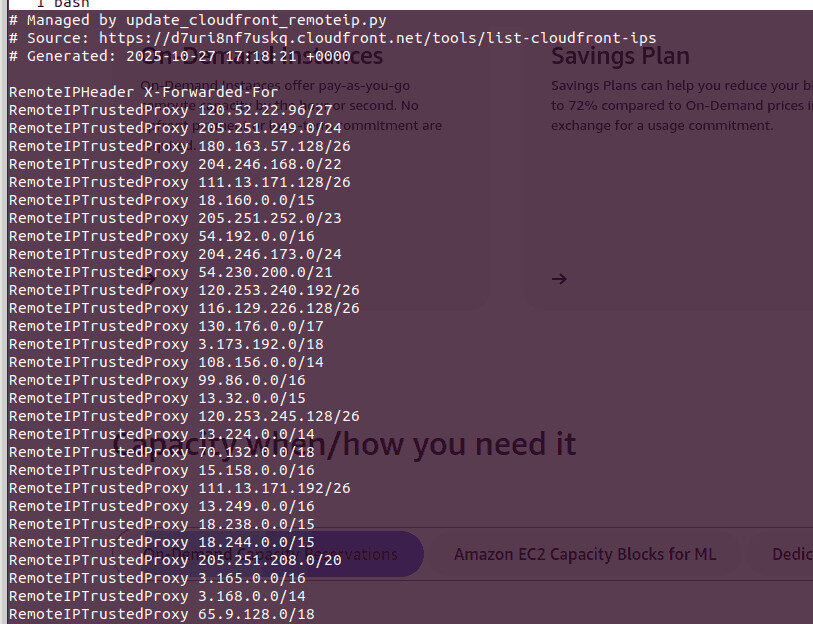
RemoteIPTrustedProxy directives that are automatically generated
Automating updates to TrustedProxy ranges in Apache for AWS CloudFront is one of those small devops improvements that prevents hard-to-debug IP issues later. With a Python script, your Apache logs stay accurate, rate limits behave correctly, and you will not need to manually chase changing CloudFront IPs ever again. For our little effort, we are now logging the correct IP using CloudFront with Apache.
Security, Firewalls now that we are Logging the Correct IP using CloudFront with Apache
Apache is recording the correct IP addresses from visitors, even when they pass through CloudFront. This means we can move on to configuring the security of any Apache-fronted services. In particular, we can implement server-level IP blocking of Apache resources, like in Apache2 Fail2ban integration.
Whether you are managing a single EC2 instance or an entire cluster, this is an easy win for reliable infrastructure.
You must enable mod_remoteip in Apache and configure the full list of CloudFront TrustedProxy IP ranges. This rewrites the incoming IP using the X-Forwarded-For header so logs reflect the real visitor, not CloudFront’s edge node.
CloudFront acts as a reverse proxy. Without configuring TrustedProxy ranges, Apache assumes the source IP is CloudFront itself and ignores the forwarded header.
IP ranges change periodically. AWS recommends consuming the JSON list programmatically. Automating the update ensures Apache stays accurate.
Python provides a simple way to fetch the IP list, write RemoteIPTrustedProxy directives, and reload Apache automatically, avoiding manual maintenance.
Yes if Apache logs CloudFront IPs instead of clients, rate limiting, GeoIP rules, and security analysis will break. Correcting the client IP is essential.